WHATSAPP FOR BUSINESS INTEGRATION
PASCOM and WhatsApp in one App
Your customers are already messaging via WhatsApp.
With the PASCOM WhatsApp for Business integration, WhatsApp becomes an integral part of your business communications. Calls, chats, and WhatsApp messages all converge in a single application. This allows you to centralize customer communication, eliminate breaks in the workflow, and achieve true omnichannel communication—all while remaining GDPR-compliant and without ever switching apps.

Tool and Channel Chaos
Customer inquiries arrive by phone, chat, and via your private WhatsApp number and are spread out across numerous apps and employee mobile phones. No centralised overview, no control, and no way to track customer interactions.
Using personal WhatsApp for business purposes
Many businesses currently use the normal WhatsApp app on their company mobile phones. This poses legal risks (GDPR), cannot be easily scaled, and is suitable for team collaboration, as only single individuals can access and reply at any given point in time.

Missed inquiries start stacking up
On WhatsApp, your customers expect quick responses. Without the ability to automatically share inquiries across your team, messages are often left unanswered for longer periods of time.

Inconsistent, disjointed communication
Sending appointment reminders or shipping notifications to customers in a standardised and easy way is not possible when using the normal WhatsApp app.
Workflow disruptions cost time
Your support employees have to switch back and forth between the phone system and their mobile phones just to have a full view over the full customer context - slowing down every inquiry.
Compliance & Data Protection uncertainty
Across the EU, and in particular the DACH region, there are serious concerns whether WhatsApp communication can be conducted in compliance with the GDPR.
Everything in one app
Calls, chats, WhatsApp messages, and shared file all converge centrally in the PASCOM app. No more switching between systems, just a unified overview of your customer contact history: the full picture is instantly available to all team members, reducing processing times and boosting service quality.
Eliminate Information Silos
Centralised team-level WhatsApp communication allows all team members to view, handle, and respond to conversations. This ensures quicker reaction times and a higher level of customer satisfaction as well as spreading the work load across the whole team instead of relying on a few individuals.
Consistent image when contacting customers
Reach customers quickly and easily using custom templates, whether service notifications, such as shipping updates and appointment reminders, or for proactive support. When a customer replies, you can continue the conversation in free form, just like in a standard WhatsApp chat.
Proven tech you can trust
No separate software, no additional tool onboarding: the PASCOM WhatsApp for Business API provides fits seamlessly into the PASCOM phone system that your team already uses everyday: telephony, chat, video and web meetings, CRM integration. All made in Germany, GDPR compliant.
"Everything in one place, finally! Telephony, Chat and Meetings now available in a single platform - all without any technical hurdles. This means more time for what's important: our customers."
Philipp Meixner, CEO, seitenwind GmbH
"We chose pascom because their phone systems offer a sleek, easy-to-use UC client and administration UI whilst providing us with all the PBX and UC features, control and visibility that we could need from our business communications solution. As a result of our excellent experience, we are happy to recommend pascom phone systems to all our customers."
Stephan Förderung, CEO, AMPAREX
"When we make decisions regarding new systems, we want to make sure that we have both reins firmly in our hands. Therefore, it is essential to implement systems which adhere to OpenStandards, allowing us to seamlessly connect and integrate these into our existing systems. In addition, we require reliable suppliers, who are ready to customise their solutions to our requirements, which is why we chose PASCOM who offer exactly this service and more."
Lars Hoeger, IT-Direktor, KiKxxl
What are the usage requirements?
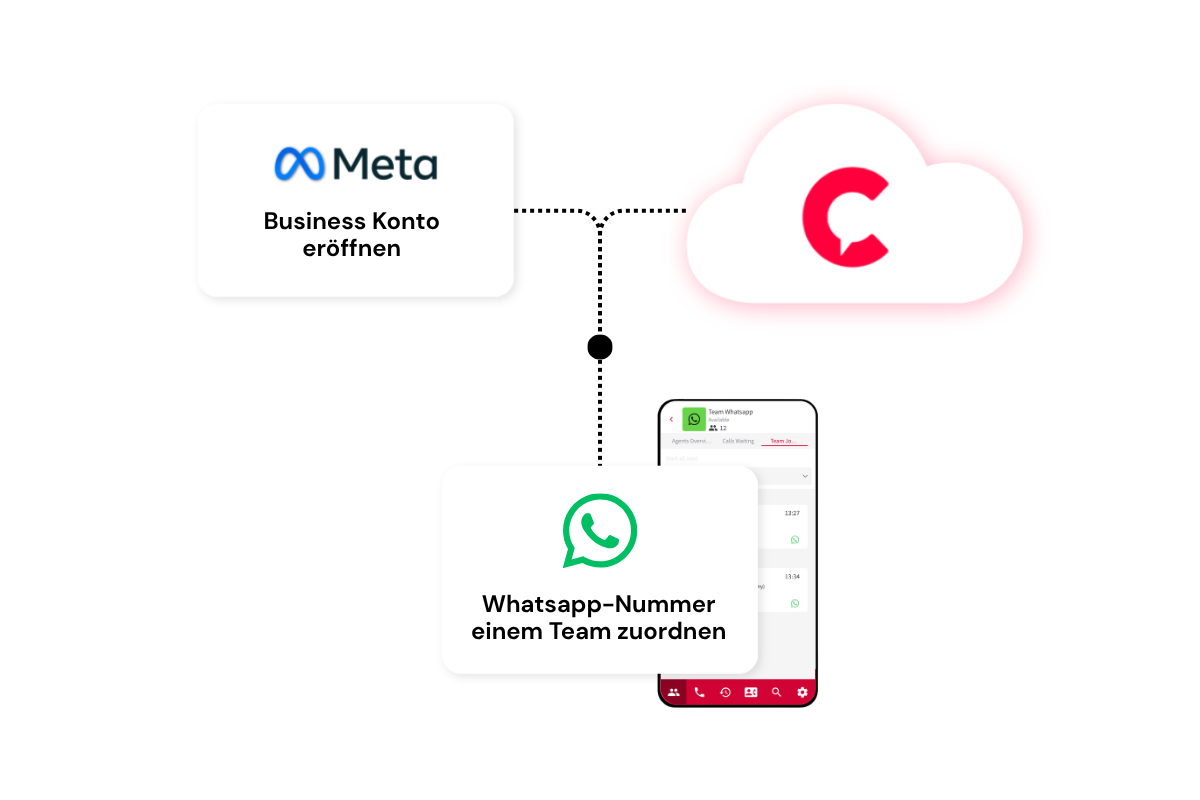
To use the WhatsApp for Business integration, you need a WhatsApp Business Account (WABA). This serves as the technical foundation for professional communication via WhatsApp and enables companies to use WhatsApp centrally and collaboratively as a team.
Depending on your existing configuration, additional steps may be required during setup - such as linking a phone number or setting up the account with META.
Can multiple employees have access to the WhatsApp messages?
Yes. Depending on your configuration, multiple employees can access both the incoming and outgoing WhatsApp messages.
As a result, customer inquiries can be managed centrally within your team. Messages are no longer tied to individual smartphones or employees. In particular, this simplifies collaboration within your teams and ensures that inquiries can be professionally handled even when employees are on annual leave, out sick or during shift changes.
Does the WhatsApp for Business incur additional costs?
When it comes to your PASCOM subscription cost, the WhatsApp for Business integration is included as standard and therefore does not incur any additional costs.
However, please note that using the META WhatsApp Business Platform can incur additional charges depending on the specific message or template categories being used to send messages. These charges will then be billed directly by META using the payment method stored within your account.
Further information regarding the actual META WhatsApp for Business prices can be found here:: https://whatsappbusiness.com/products/platform-pricing/#rates
Does using the PASCOM WhatsApp for Business integration comply with Data Protection Laws?
Yes. The integration has been designed for the professional and data protection compliant usage within a business environment.
Using PASCOM's WhatsApp for Business ensures that messaging and communication are cleary separated from personal WhatsApp messages. In addition, communication via the WhatsApp Business Platform is subject to relevant data protection requirements as well as METAs specifications and guidelines.
As with any business communication solution, companies should also take their specific data protection requirements and internal processes into account.
Are messages sent via WhatsApp secure?
Yes. Communication via the WhatsApp Business Platform takes place using the infrastructure provided by WhatsApp and Meta and is subject to the platform's corresponding security mechanisms.
At the same time, this integration enables a clear separation between private and business communication. Consequently, employees do not need to use their private WhatsApp accounts or personal smartphones to communicate with customers.
What are the most popular features and benefits of the integration?
The WhatsApp Business integration offers companies the key advantage of professionally incorporating one of their customers' favorite communication channels into their own corporate communications.
Key features and benefits include:
- Centralized management of incoming messages: Customer inquiries via WhatsApp can be received, managed, and processed centrally.
- Team access to messages: Depending on the specific configuration, multiple employees can access communications and handle customer inquiries collaboratively.
- Clear separation of private and business communication: Employees do not need to use their personal WhatsApp accounts for customer communication.
- Personalized customer communication: Companies can communicate directly, quickly, and personally with their customers.
- Support for various content types: In addition to standard text messages, images, files, and other supported media can be exchanged.
- Structured communication: Templates allow for the efficient, standardized sending of items such as appointment reminders, notifications, and marketing messages.
In this way, the integration combines the simple, familiar communication experience of WhatsApp with the requirements of professional corporate communication.
Why do I have to use WhatsApp message templates?
The use of so-called message templates is a requirement set by Meta for the WhatsApp Business Platform.
Whenever your company initiates a new conversation with a customer, or when communication takes place outside the time window defined by WhatsApp, a Meta-approved message template must generally be used.
These templates are reviewed by Meta before use and can be employed for use cases such as:
- Appointment reminders
- Shipping and delivery notifications
- Order information
- Service information
- Marketing campaigns and offers
This allows Meta to ensure that companies cannot contact customers indiscriminately with arbitrary messages and that communication complies with WhatsApp Business Platform guidelines.
What is the 24-hour window on WhatsApp?
The 24-hour window enables highly flexible communication with your customers.
When a customer messages you via WhatsApp or replies to a message, a 24-hour window opens. Within this timeframe, you can respond to the customer freely and personally—much like in a standard WhatsApp conversation.
For example, you can:
- answer specific questions,
- send additional information,
- exchange images or documents,
- ask follow-up questions, or
- provide personal advice.
The 24-hour window resets with every new message from the customer.
Outside of this window, the WhatsApp Business Platform’s standard rules apply. If you wish to proactively send a new message to the customer, an approved message template is generally required.
This allows you to use templates strategically for purposes such as appointment reminders, shipping updates, or marketing campaigns, while maintaining flexible, personal communication during an ongoing conversation.
What costs are incurred on the part of PASCOM and Meta?
There are no additional costs from PASCOM for the WhatsApp Business integration.
However, Meta may charge fees for certain messages or templates sent via the WhatsApp Business Platform. The cost depends on factors such as the specific message category and Meta's current terms.
Any applicable fees are charged to the payment method stored in your Meta Business Account.
As Meta may change its pricing and billing models, you can find the latest terms directly on the official WhatsApp Business website: https://whatsappbusiness.com/products/platform-pricing/#rates