
Category: Unkategorisiert
Posts
Christmas 2023 PASCOM Support and Opening Times
Merry Christmas and a Happy New Year From pascom
2023 has flown by and 2024 is just around the corner which means that it's that time of year again when we wish all our customers, partners, and users a very Merry Christmas and a happy New Year.
As is customary at this time of year, we would like to thank all our customers, partners, users and colleagues for their continued loyalty and trust in us and our solutions throughout 2023. Before we say farewell to 2023, we would also like to take this opportunity to provide you all with some important information regarding support, tips for managing your phone system during the holidays and how to catch up with PASCOM at upcoming events in January.
Technical Support & Christmas Opening Times
The PASCOM Support team will be available as normal (with reaction times according to SLA) throughout the Christmas / New Year break, meaning our PASCOM customers will still be able to access our support services throughout the holidays. For response times, please refer to your PASCOM Service Level Agreement.
For all other enquiries, the PASCOM offices will be closed from Friday 22nd December and will reopen again on Tuesday 2nd January 2024 at which point, our team will ready and raring to go.
Get Your Business Communications Fit for The Holidays & Beyond
As is always the case at this time of year, it is important to make sure that your phone system is setup according to the holiday season. So, as we the holidays and New Year period approaches, businesses of all shapes and sizes must prepare their business communications platform for the festive season and beyond. Depending on your business model, this will entail a number of changes to the normal configuration:
Business Hours, Public Holiday Calendar Checks & Prompts
If your business hours change or services/departments close for the holidays, then you will need to update your opening hours and time checks to reflect your business hours during the Christmas / New Year period.
To do this, simply log in to your phone system admin UI and follow the instructions as described in our documentation.
Once you've got your calendars and business hours checks sorted, it is time to update your phone system prompts and music on hold to match the holiday season. A tip from us is to share the festive cheer this year with warm season greetings and some appropriate music on hold as well as to provide additional information such as opening hours in your prompts - just be sure to check for any music licensing requirements.
Update All Your Communications Channels
While your business phone system is central to how you communicate with customers, it is not your only communication channel, so be sure to update, change and modify your messaging across all channels as appropriate. For example, any auto responders that you use for online chat such as Messenger etc will need to updated to greet your customers and provide them with the appropriate information they need.
There are things that are easy to do and make a big difference when it comes to managing customer expectations and experiences but are often forgotten.
Automatic "Out of Office" E-Mails
Setting up good automatic out-of-office e-mail replies is a great way to share information with customers who e-mail you. To make them effective, your auto-reply must give the customer all the information they need in a friendly and informative manner. Therefore, your auto-reply should contain the dates that you are unavailable when you are back and information on what to do if the enquiry is urgent and can’t wait until your return to the office.
Social Media Updates
As you would expect, most businesses are pretty good at posting their best wishes for the holiday season - they don’t want to appear as Scrooge or Grampus, etc. However, posting information regarding opening hours & tips for customers who are trying to contact your business is something worth doing as it helps avoid customer disappointment. As discussed above, a great example is updating your Facebook Messenger auto responder.
Update Your Google Opening Hours
This is one of my pet hates - how annoying is it when you google a company for contact and opening information, only to find that the information hasn’t been updated, and you’re left in the lurch. Updating your My Business google listing is simple and can be done in less than five minutes. Therefore, you have no excuses for keeping this information up-to-date and not just at Christmas!
Future Proof Your Business Communications in 2024
Looking at the holidays and beyond, for many businesses the Christmas break provides IT admins and phone system managers with the ideal time to plan and implement a number of optimisations. Once again, this year has been a year of change within the IT landscape with Hybrid Working, Cloud Communications, Mobile VoIP Apps and Video Conferencing all continuing to grow in the world of business communications. For many businesses, 2023 has been a consolidation year, whereby they have been replacing the stop gap solutions they adopted between 2020 and 2022 with all-in-one solutions that they can rely on a permanent basis going forward. In particular, we’ve noticed a significant uptake in complete solutions including SIP trunking services, meaning that businesses are looking not only to replace old or stop gap solutions, but are looking for to consolidate their tech stack to the minimum of solution providers. This trend looks set to continue into 2024 meaning that for businesses with lower call volumes and demand over the holidays can use this period to update and upgrade their infrastructure and solutions before 2024 kicks-off.
The benefits of adopting an all-in-one business communications solution are as far-reaching as they are varied. Firstly, all-in-one solutions simplify your life in that you only have one platform to manage and your users only one app to use. This will also help reduce and minimise the threat posed by shadow IT. Next, if your boss loves fancy new stuff, they will love having the latest fancy stuff in one app. Plus, they will see a rise in employee productivity. Finally, your accounts team will likely thank you for reducing the number of monthly invoices they have to process, which has the added benefit of making your decision look great on the balance sheet.
So if your business experiences a lull over the Christmas period, then this is the perfect time to try and test.
Upcoming Events
Regardless of whether you are a PASCOM customer, partner, or PASCOM mobile / desktop client user, 2024 will provide you with plenty of opportunities to catch up with us as we hit the road running.
First up, we have our regular monthly reseller partner briefing on the 10th of January. As a PASCOM partner, you will receive an email in the first week of January 2024 with information on how to register.
Next, the 11th of January sees our weekly PASCOM BOOTCAMP webinars returning after the Christmas / New Year break, and we can’t wait to see lots of PASCOM phone system customers, partners, and prospects joining us as we kick off 2024.
To round off an action-packed start to the year, you can meet the PASCOM team in person at the TAX Arena expo in Hannover on February 28th, where we will be showcasing how PASCOM helps tax advisors, in particular DATEV users, upgrade their business communications.
For more info on PASCOM events, please visit our events page:
We're here to help
If you have any queries about PASCOM phone system features and how to use them, then check out some more Video Collaboration posts as well as our desktop client, mobile app and web client user guides listed in our documentation.
If you, your team, your colleagues, or customers could benefit from an effective all-in-one video and business collaboration solution, then we’re here to help. Just give us a call on +49 991 291691 0 and get started with our free cloud phone system edition.
Wishing you a very Merry Christmas and Happy New Year 2024!
VoIP Phone System Guide to Network Integration
VoIP Phone System Guide to Network Integration
Continuing on in our VoIP phone system guide, this article focuses on VoIP Network Integration. In other words, we are getting to grips with the question of how to integrate your IP PBX (VoIP phone system) into your existing infrastructure. Compared to a legacy PBX in which the telephones are connected via a separate network, IP based systems offer a number of advantages. For example, you need only maintain one network and a host of additional functions are available such as desktop and mobile UC applications plus the option to connect to CRM / Ticket systems or phone books is always available. Beyond this, with an IP PBX (or VoIP phone system software) voice calls are no longer transmitted over traditional telephone lines, such as the ISDN or POTS, but rather sent in encrypted packet form over the Internet.
A typical VoIP software based phone system is a hugely comprehensive product that includes a multitude of features. These range from Auto Attendant automatic answering functions and advanced call and contact centre tools such as Skills Based Routing through to the features required to video telephony and conferencing. So create a list of all the features that are essential for you, your employees and your customers and you will be some way to deciding which solution is right for you. You will also likely notice that there are a number of integration options which are based of different frameworks which we will cover in more detail. Moreover, we will separately cover which important functions are must haves and should be offered by a VoIP telephone system.
How to choose the right VoIP software solution?
A professional telephone system will support your business in portraying a high value professional image to your customers. The phone system configuration and applications available will have a decisive influence on how professionally you manage your call volumes, making choosing the right business communications platform essential to ensure the optimal performance and benefits are gained. This is as true for larger organisations as it is for small business and start-ups. Perhaps it is even more essential in the highly competitive SOHO / SMB segments where business need to stand out from the crowd in order to succeed.
How many employees should use the solution?
Not every solution presented below is ideally suited to every business. For example, choosing a cloud solution has many advantages such as lower cost to entry for startups and SMBs. However, a production house may require on-site hardware for health and safety reasons. In the past, people only views cloud solutions as only being suitable for businesses up to ca. 25 employees.
However, this is arguement really only ever considered user licensing and the Total Cost of Ownership based on the number of users and ignored all the other benefits that cloud phones systems have to offer. Therefore, larger companies should ignore the cloud. There are considerably more benefits to Cloud solutions than simply lowering upfront costs.
If your business has reached a certain size, the technology itself almost plays a secondary role. What comes to the fore with our customers is the need to centralise and standardise the communications platform. It is, however, often the case with large enterprise that the company has a central HQ that is fully independent of the smaller business locations.
As a result, the branch locations will generally have an in-house IT team who manage an on-premise phone system – whether virtual or hardware based. As a result, for large enterprise customers it is important to find a solution that enables them to integrate a centralised communication solution.
Option A: Integrating into an Existing Company Network
In particular, it is relatively straightforward to integrate a new phone system directly into small and medium sized networks as such integrations only require relatively minor modifications to the existing IT landscape. If you have a pre-existing DHCP server, this can be used for and by the telephone system. Alternatively, PASCOM on-premise VoIP solutions come with an inbuilt DHCP server that can be utilized by the complete network or configured to be used only by the phone system and desktop phones.
Most modern IP desktop phones are equipped with an internal switch (gigabit has become the standard). This can be used to connect the phone directly to a workstation PC or to integrate further endpoints to the network. This can save excess cabling and is particularly useful when there is an insufficient number of LAN ports available on the network.
Option B: Separate Telephony and Company Networks
For maximum flexibility and operational security, the telephone system should be deployed and run inside a telephony network separated from the company network. Such network architectures offer a multitude of benefits including:
- Problems with bandwidth assignment (Quality of Service) and conflicts with existing network services can be avoided. A notable example is avoiding your telephony traffic becoming affected by high volume usage on the company network.
- Access to the telephony network can be controlled via a Firewall.
- Some VoIP phone systems, such as pascom’s, deliver a DHCP server interface for the telephony network, meaning no additional DHCP service modifications are required on the company network.
It is not necessary to physically separate the two networks. Modern switches are designed to allow you to setup so-called VLANs (Virtual Local Area Network). For example, when using a 48 port switch it is possible to connect all phones on ports 1-24 and on ports 25-48 all PC workstations.
Option C: Integration and Migration of an Existing Telephone System
Top of the range IP phone systems like pascom’s can be connected to an existing ISDN telephone system with relative ease. This allows for a step-by-step move away, or soft-migration, from the ISDN system to the new modern IP solution IP should for example an immediate switch out of endpoints not be possible or extremely impractical.
Such integrations should only be undertaken after careful consideration, particularly as a soft migration involves two phone system solutions to be maintained simultaneously which requires additional resources in terms of manpower and man-hours.
Option D: Switch to a Hosted Cloud Phone System
Switching to a cloud phone system is now the most popular option so it is no wonder that adoption of cloud technology has really taken off in the last few years. Within the world of telecommunications, Cloud phone systems (cloud PBX) are now the preferred choice for many businesses and with good reason.
Hosted cloud PBX solutions deliver a number of advantages over the on-premise variations, in fact there are very few scenarios in which an on-premise solution is actually more suitable. The question remains however, what should the required network infrastructure look like?
In terms of networking, the cabling required for a cloud solution is similar to that required by an on-premise VoIP phone system, but considerably less than for a legacy solution. You will require a router with Internet access and depending on the size of your company, a number of switches to connect workstations and any desktop phones that you may require. Through using softphones, it is possible to further reduce the amount of cabling required.
The main difference lies in that once the initial set up and software installation has been completed. From this point on, you should be able to significanlty reduce your administrative overheads as you will no longer need to maintain your business phone system as this is done by your provider. Nor will you need to maintain any cumbersome hardware or VPN infrastructures that your previous telephony solution required.
Network Summary
How you choose to construct your network is entirely up to you. A competent VoIP phone system provider will also have a good knowledge concerning network infrastructures and will be able to advise you on the setup.
In principle, you can cancel your existing conventional landline connection or migrate the account to a SIP provider. With a VoIP software based telephonysolution, you will be able to almost immediately start making IP calls over the Internet to the PSTN, from you mobile or via video Internet telephony. However, it is recommended to check beforehand if any other endpoints or terminals in your fleet of devices require access to the conventional landline.
A business phone system is more than just a server and a few desktop phones. Thanks to the interconnecting PCs, work locations, desktop phones and mobile devices, a first-class business VoIP phone system will offer you a high degree of comfort. You will require IP compatible phones. IP telephones communicate using the same network technology as PCs – namely IP or Internet Protocol. Options such as the CTI interface for connecting phones and PCs will only function with IP phones and therefore ensure the out dated ISDN endpoints become obsolete.
As mentioned above, it is possible to migrate or port your existing phone numbers from the ISDN to a VoIP provider, quite often free of charge. However, you should inform your current provider in advance and set the porting process in motion.
For more information regarding PASCOM VoIP solutions and the move to ALL IP, contact us and our team will be happy to advise on the best solution for your business.
Christmas 2022 PASCOM Support and Opening Times
Merry Christmas and a Happy New Year From pascom
2022 has flown by and 2023 is fast approaching, meaning that it's that time of year again to wish all our customers, partners, and users a very Merry Christmas and a happy New Year.
As is customary at this time of year, we would like to thank all our customers, partners, users and colleagues for their continued loyalty and trust in us and our solutions throughout 2022. Before we bid 2022 adieu, we would also like to take this opportunity to provide you all with some important information regarding support, tips for managing your phone system during the holidays and how to catch up with PASCOM at upcoming events in January.
Technical Support & Christmas Opening Times
The PASCOM Support team will be available as normal (with reaction times according to SLA) throughout the Christmas / New Year break, meaning our PASCOM customers will still be able to access our support services throughout the holidays. For response times, please refer to your PASCOM Service Level Agreement.
For all other enquiries, the PASCOM offices will be closed from Friday 23rd December and will reopen again on Monday 2nd January 2023 at which point, our team will ready and raring to get 2023 off to a flying start.
Get Your Business Communications Fit for The Holidays & Beyond
As is always the case at this time of year, it is important to make sure that your phone system is setup according to the holiday season. So, as we race into the holidays and New Year period, businesses of all shapes and sizes must prepare their business communications platform for the festive season and beyond. Depending on your business model, this will entail a number of changes to the normal configuration:
Business Hours, Public Holiday Calendar Checks & Prompts
If your business hours change or services/departments close for the holidays, then you will need to update your opening hours and time checks to reflect your business hours during the Christmas / New Year period.
To do this, simply log in to your phone system admin UI and follow the instructions as described in our documentation.
Once you've got your calendars and business hours checks sorted, it is time to update your phone system prompts and music on hold to match the holiday season. A tip from us is to share the festive cheer this year with warm season greetings and some appropriate music on hold as well as to provide additional information such as opening hours in your prompts - just be sure to check for any music licensing requirements.
Update All Your Channels
While your business phone system is central to how you communicate with customers, it is not your only communication channel, so be sure to update, change and modify your messaging across all channels as appropriate. There are things than are easy to do and make a big difference when it comes to managing customer expectations and experiences but are often forgotten.
Automatic "Out of Office" E-Mails
Setting up good automatic out of office e-mail replies is a great way to share information with customers who e-mail you. To make them effective, your auto reply must give the customer all the information they need in a friendly and informative manner. Therefore, your auto reply should contain the dates that you are unavailable when you are back and information on what to do if the enquiry is urgent and can't wait until your return to the office.
Social Media Updates
As you would expect, most businesses are pretty good at posting their best wishes for the holiday season - they don't want to appear as Scrooge or Grampus etc. However, posting information regarding opening hours & tips for customers who are trying to contact your business is something worth doing as it helps avoid customer disappointment. A great example is updating your Facebook Messenger auto responder.
Update Your Google Opening Hours
This is one of my pet hates - how annoying is it when you google a company for contact and opening information, only to find that the information hasn't been updated and you're left in the lurch. Updating your My Business google listing is simple and can be done in less than five minutes. Therefore, you have no excuses for keeping this information up-to-date and not just at Christmas!
Future Proof Your Business Communications in 2023
Looking at the holidays and beyond, for many businesses the Christmas break provides IT admins and phone system managers with the ideal time to plan and implement a number of optimisations. Once again, this year has been a year of change within the IT landscape with Hybrid Working, Cloud Communications, Mobile VoIP Apps and Video Conferencing all continuing to grow in the world of business communications. For many businesses, 2022 has been a consolidation year whereby they have been replacing the stop gap solutions they adopted in 2020 and 2021 with all-in-one solutions that they can rely on a permanent basis going forward. This trend looks set to continue into 2023 meaning that for businesses with lower call volumes and demand over the holidays can use this period to update and upgrade their infrastructure and solutions before 2023 kicks-off.
The benefits of adopting an all-in-one business communications solution are as far reaching as they are varied. Firstly, all-in-one solutions simplify your life in that you only have one platform to manage and your users only one app to use. This will also help reduce and minimise the threat posed by shadow IT. Next, if your boss loves fancy new stuff, they will love having the latest fancy stuff in one app. Plus, they will see a rise in employee productivity. Finally, your accounts team will likely thank you for reducing the number of monthly invoices they have to process which has the added benefit of making your decision look great on the balance sheet.
So if your business experiences a lull over the Christmas period, then this is the perfect time to try and test.
Upcoming Events
Regardless of whether you are a PASCOM customer, partner, or PASCOM mobile / desktop client user, January 2023 will provide you with plenty of opportunities to catch up with us as we hit the road running.
First up, we have our regular monthly reseller partner briefing on the 11th of January. As a PASCOM partner, you will receive an email in the first week of January 2023 with information on how to register.
Next, the 12th of January sees our weekly PASCOM BOOTCAMP webinars returning after the Christmas / New Year break and we can’t wait to see lots of PASCOM phone system customers, partners, and prospects joining us as we kick-off 2023.
The next PASCOM DIRECT YouTube live stream is scheduled for January 25th. If you don’t know about PASCOM DIRECT yet, it’s the perfect place for PASCOM desktop and mobile app users to get informed on all the latest new features, get questions answered and of course pick up plenty of useful tricks along the way.
To round off an action-packed start to year, you can meet the PASCOM team in person at the TAXArena expo in Hannover on January 31st, where we will be show casing how PASCOM helps tax advisors, in particular DATEV users, upgrade their business communications.
For more info on PASCOM events, please visit our events page:
https://www.pascom.net/en/pascom-events/
We're here to help
If you have any queries about PASCOM phone system features and how to use them, then check out some more Video Collaboration posts as well as our desktop client, mobile app and web client user guides listed in our documentation.
If you, your team, your colleagues, or customers could benefit from an effective all-in-one video and business collaboration solution, then we're here to help. Just give us a call on +49 991 291691 0 and get started with our free cloud phone system edition.
Wishing you a very Merry Christmas and Happy New Year 2023!
PASCOM 2020 Year in Review
2020: Challenge and Opportunity
As is often the case, with every challenge comes opportunity, so while 2020 has most definitely been a trying year dominated by the pandemic, it has also been a year of opportunity for the telecommunication industry software vendors. Further to this, 2020 has shown that Working From Home is possible and despite all the challenges of remote working, 2020 has seen PASCOM achieve several important milestones in terms of growth and expansion.
Business as Usual
Our reaction to the pandemic was to continue with "Business as Normal" as much as possible whilst ensuring the health, safety and wellbeing of our employees. As a business communication and collaboration solutions vendor, we already had all the tools and are well acquainted with working from home. As a result, we did the responsible thing and switched our entire operation to Remote Working. For us, all this entailed was a single group chat message and less than half a morning of moving desktop computers (and monitors) from the office to the required HomeOffices.
In terms of how we communicated as a business, we deliberately decided against getting involved in the “Free” fanfare. Instead, we made sure our focus lay on our customers and partners and advising them on how best to scale and manage their solutions to accommodate remote working, which tools to use and when. In this way, we ensured the reliable, smooth running of our services whilst retaining the ability to scale our cloud infrastructure capacity as demand soared both in terms of new customers and average seat deployment sizes.
Company Growth Continues
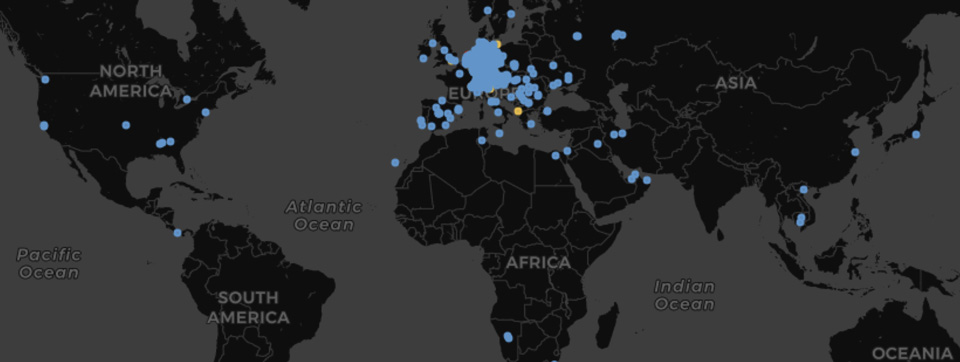
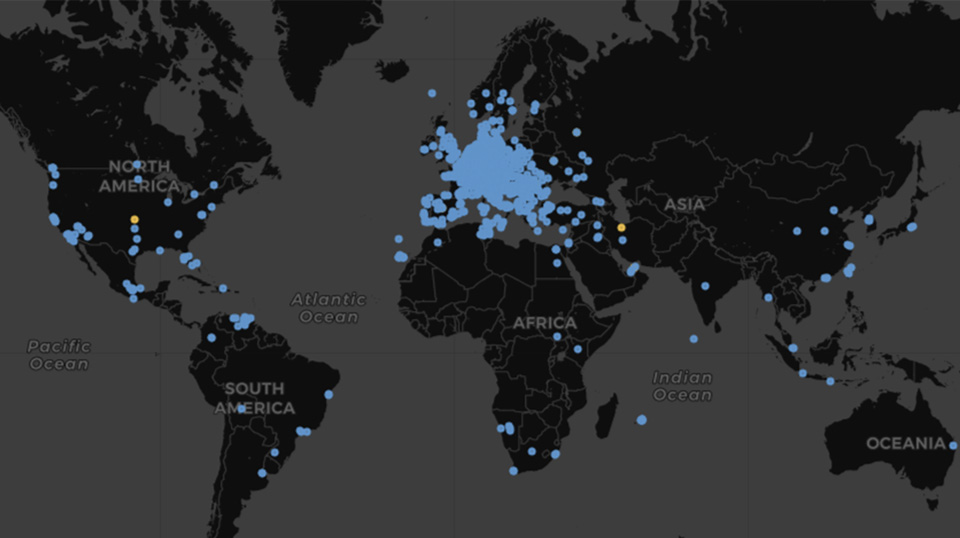
As a telecoms specialist, is it not surprising that 2020 has been a strong year for PASCOM growth. We’ve witnessed a 15% increase in new business phone system deployments, 30 % channel growth in terms of partner acquisition and revenue, a 60 % increase in web traffic plus a record number of new employees joining the team. Furthermore, deployment statistics show cloud phone systems are now unequivocally the preferred deployment type (78% in 2020) while usage analysis indicates a dramatic surge in popularity for pascom's desktop and mobile UCC apps predominantly across Europe but globally as well - notably in North and South America.
PASCOM UC client usage 2019
PASCOM UC client usage 2020
Channel Growth
Despite 30 % growth in channel partner acquisition and channel sales, 2020 broke the trend of recent years as direct sales overtook channel sales. Most likely, this is symptomatic of organisations opting for cloud solutions and preferring to deal directly with Managed Service Provider vendors as opposed to resellers.
While not specific to the pandemic, the pandemic definitely worsened the situation by highlighting the issues facing the channel and demonstrating the importance of strong channel partner programmes that support and allow partners to resell vendor managed services and cloud solutions.
PASCOM Recruitment Drive
Throughout 2020, PASCOM enjoyed significant team growth as we welcomed our 30th employee and onboarded nine new colleagues over the year. Our offices in Serbia enjoyed accelerated expansion over the last 12 months growth with five new members of staff joining the PASCOM family. That said, growing a team from scratch whilst facing the restrictions of a pandemic and limitations of remote working was not without it's challenges, so it a great testament to the team that they have grown so smoothly, perhaps in part because they took the time to bond during a weekend hiking and caving adventure in the Mountains of Serbia.

The growth of the PASCOM team in Germany and Serbia has resulted in a significant increase in our software development, infrastructure management and quality assurance capacities. That means we are now in a stronger position in terms of future PASCOM business communications platform development and simultaneously ensuring our customers continue to receive the highest levels of service in terms of quality and performance.
Video Collaboration Now Mainstream
The 2019 release of PASCOM 19 saw the introduction of the new PASCOM desktop and mobile video and team collaboration tools.
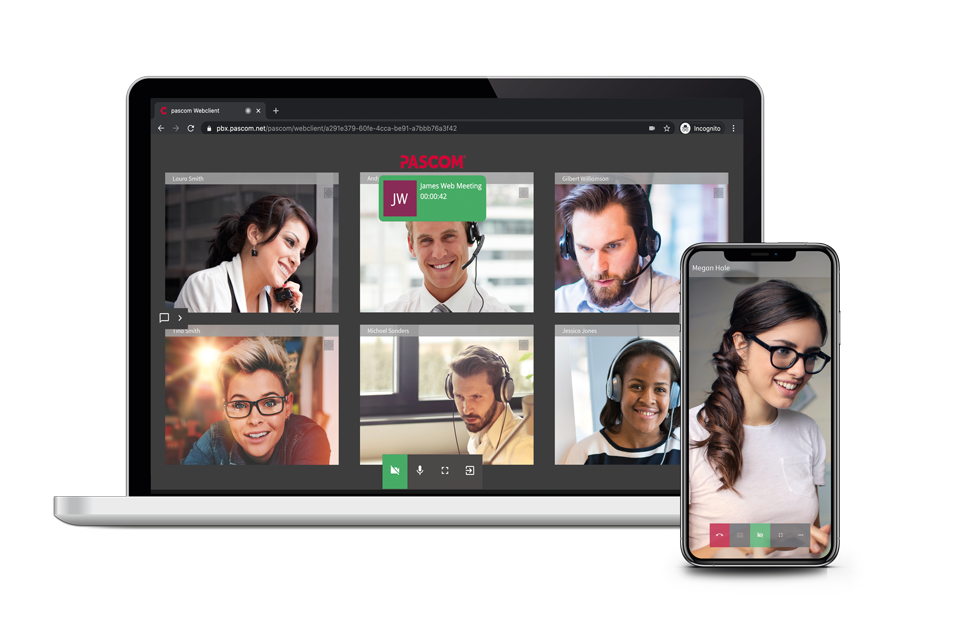
Early in 2020, we further enhanced our video collaboration suite by integrating WebRTC video technology and our new web meeting tools. The new functionality enabled PASCOM users to create virtual video meeting rooms and invite external participants, i.e. customers and prospects, to join and participate via their web browser.
The release of the PASCOM web client had long been in the pipeline which when coupled with the surge in remote working and the resulting rise in video and mobile collaboration, cemented pascom's reputation as a leading all-in-one communications solution provider.
New BETA Programme
In previous years, we have proactively encouraged PASCOM partners and select customers to actively participate in desktop and mobile client BETA testing programmes. In 2020, we expanded our BETA programme to include the PASCOM phone system server. The concept of the new BETA scheme is to further enhance our in-house ALPHA and BETA testing by uncovering a broader range of potential issues thanks to more in-depth and widespread testing within production environments. Participation in the new BETA programme is restricted to PASCOM Certified partners and above, thus ensuring qualified feedback and in turn guaranteeing release version platform stability and enhanced performance levels.
Business Communications in 2020 and 2021
Even at the end of 2019, Video Conferencing was still considered nice-to-have, not a must-have and mobile VoIP apps were for the boss and field sales. Well, 2020 has taken the rule book, turned it inside out before ripping it to shreds and leaving it in tatters. In short, 2020 has likely changed the way we work forever.
One positive of the situation is that the experience has demonstrated that the tech is up to the challenge and that the global workforce can quickly adapt. Becoming increasingly popular in recent years, the emergence of cloud communication, video collaboration and mobile communication apps have proved crucial in enabling remote working and assuring business continuity.
Companies that had already transformed were perhaps better equipped to face the challenge. Those that had not needed to quickly find stop-gap solutions by adopting a plethora of communication apps and platforms. Such a communication infrastructure can be effective in the short-term to fulfil an immediate need. However, disjointed communication solutions have several long-term drawbacks, ranging from complex management to inefficient and insecure workflows leading to productivity losses.
As we look forward to 2021, what we expect to see is more of the same in terms of remote working. That means softphone and mobile VoIP app usage will continue to be mainstream and the importance of team collaboration tools (video, messaging and file sharing) will continue to grow. Alongside the tools, we believe that businesses will look to increase the productivity of their remote workforces in terms of employee collaboration and the customer contact experience.
As such, we expect the result will be more and more business conducting some form of vendor consolidation through adopting all-in-one cloud communication platforms as they look to future proof their business communications and provide their employees will the complete package in terms of communication tools and usability.
We're here to help
If you have any queries about PASCOM phone system features and how to use them, then check out some more Video Collaboration posts as well as our desktop client, mobile app and web client user guides listed in our documentation.
If you, your team, your colleagues or customers could benefit from an all-in-one video and business collaboration solution, then we're here to help. Just give us a call on +49 991 291691 0 and get started with our free cloud phone system edition.
Christmas 2020 PASCOM Support and Opening Times
Merry Christmas and a Happy New Year From pascom
2020 has been a challenging year for us all, and even though we can't be together in-person this Christmas and New Year, that doesn't mean we can't or shouldn't share the festive spirit. So it is without further adieu that we gladly bid 2020 farewell and look forward to welcoming 2021 with optimism renewed.
With this is mind, we would like to thank all our customers, partners and colleagues for their renewed loyalty and faith in us throughout 2020 and we wish everyone a very Merry Christmas and a happy New Year 2021. May your holidays be safe and filled with virtual joy whether that be on the phone, video or both.
Christmas Opening Times and Support
The PASCOM Support team will be available as normal (according to SLA) throughout the Christmas / New Year break, meaning our PASCOM customers will still be able to access our support services throughout the holidays. For response times, please refer to your PASCOM Service Level Agreement. The rest of the PASCOM team from sales to accounts will be enjoying a much needed break from the routine of HomeOffice from Thursday 24th December until Monday 4th January 2021. The PASCOM Support Hotline will be staffed throughout the holidays.
Get Your Business Communications Fit For The Holidays & Beyond
In a year where changes to business opening hours, operating proceedures and phone system configuration have been performed far too often, here's a few more. As we build up to the holidays and the new year, businesses of all shapes and sizes must prepare their business communications platform for the festive season and beyond. Depending on your business model, this will entail a number of changes to the normal configuration:
Move The Christmas Staff Party Online
Just because we're all working from home and it's not possible to hold in-person Christmas staff parties this year doesn't mean that business should forego the annual tradition. Per default, we limit the max number of video stream per session to 6 for productivity reasons (less screens = more interactive meetings), but increasing the number is easy. Simply update your PASCOM Video Settings within the admin UI (System Settings > sys.xmpp.properties.video.maxpublishers) and increase the maximum number of permitted video streams to allow the required number of employees to join in the virtual fun.
A good tip for larger companies is to break it down into teams or departments in order to avoid screen clutter. Another fun thing to do to share some festive cheer could be to arrange some sort of gift or beverage to be sent to your employees in HomeOffice whilst perhaps stipulating a Xmas dress code and so on.
While it's true that the secret to great, engaging and productive video meeting to keep them small, updating this setting could actually be beneficial in the long run for those few times when more video streams are simply unavoidable.
Business Hours, Holiday Checks & Prompts
If your business hours change or services/departments close down for the holidays, then you will need to update your opening hours and time checks to reflect your business hours during the Christmas / New Year period. This should be communicated across all your communication channels from your online presence to updating your phone system prompts and music on hold. A tip from us is to share the festive cheer this year with warm season greetings and some appropriate music on hold (be sure to check any music licensing requirements) as well as to provide additional information such as opening hours in your prompts.
Future Proof Your Business Communications
Looking at the holidays and beyond, for a large number of businesses the Christmas break provides IT admins and phone system managers with the ideal time to plan and implement a number of optimisations. 2020 has seen a lot of changes to the IT landscape with HomeOffice, Cloud Communications, Mobile VoIP Apps and Video Conferencing all becoming mainstream. For many businesses, the adoption of such technologies has been done on the fly as a coping mechanism to ensure some sense of continuity. But stop gap measures are never meant to be permanent and can actually damage your business long-term.
The benefits of adopting converged all-in-one solutions are as far reaching as they are varied and definitely should not to be ignored. Firstly, it will make your life easier on a number of levels; you will only have a single platform to manage and the threat of shadow IT will be significantly reduced. The boss will love it as they will have the latest fancy stuff and they will see a rise in employee productivity. Finally, the accounts team will likely thank you for reducing the number of monthly invoices they have to process which also has the added benefit of making your decision look great on the balance sheet.
So if your business experiences a lull over the Christmas period, then this is the perfect time to try and test better equipped platforms that offer a more rounded "all-in-one" solution. Not only will this help get your business communications back on track and up to task in 2021.
We're here to help
If you have any queries about PASCOM phone system features and how to use them, then check out some more Video Collaboration posts as well as our desktop client, mobile app and web client user guides listed in our documentation.
If you, your team, your colleagues or customers could benefit from an effective all-in-one video and business collaboration solution, then we're here to help. Just give us a call on +49 991 291691 0 and get started with our free cloud phone system edition.
Merry Christmas, stay safe, stay heathy and see you in 2021!
Merry Christmas from pascom
Merry Christmas and a Happy New Year From pascom
The festive season is fast approaching and before we head off for the holidays, we just wanted to take this opportunity to thank all our customers and partners for yet another excellent year and wish you all a very Merry Christmas and a Happy New Year 2020.
Christmas Opening Times and Support
Throughout the holiday season, our offices will be closed from Monday 23rd December 2019 and reopen again on Thursday 2nd January 2020. The PASCOM Support Hotline will be staffed throughout the holidays, meaning our PASCOM customers will still be able to access our support services throughout the holidays. For response times, please refer to your PASCOM Service Level Agreements.
Is your phone system ready for the holidays?
As we build up to the holidays, businesses of all shapes and sizes are preparing their business communications platform for the festive season. Depending on your business model, this will entail a number of changes to the normal configuration.
Business Hours, Holiday Checks & Prompts
Such a change would include updating your opening hours and time checks to reflect your business hours during the Christmas / New Year period. Another consideration would be to update your phone system prompts to festively greet callers and provide additional information such as opening hours.
Reduce Staff Attrition with Intelligent Queueing
If you operate a larger business, particularly in the retail sector, peak seasons such as Christmas will undoubtedly add additional strain to your Contact Centre operations. Many factors such as staff holidays, increased call volumes, holiday public transport time plans, and even the weather can affect your staffing levels and staff workloads. Through using intelligent call routing, customers can be directly routed to the correct agent, improving first call resolution and improving your overall customer and employee experiences (CX / EX), which directly impacts your bottom line.
Enhance CX with Call Labels & Analytics
For contact centre agents, utilising technologies such as "Call Labels" will provide them with essential caller information before they even answer, allowing agents to personally greet callers and avoid time consuming questions that irritate callers. Meanwhile, Customer Service and Contact Centre managers can use wallboards to view real-time call data and performance information enabling them to detect and immediately to detect and react to changes in volumes or behaviours.
Enhance Employee Experiences with Unified Communications
Through enabling Unified Communication tools such as softphones, desktop / mobile UC and team messaging, your employees and customer service team can be available from anywhere, meaning that no matter what, if needs be they are available, can deliver excellent customer service AND still enjoy the holidays.
No matter which changes you should be making to your phone system, our best advice is to consider both what is good for your customers and what is good for your employees. Being experience centric ensures that employees have all the tools to do the job effectively and therefore improve employee satisfaction. This in turn will boost your customer satisfaction and therefore positively affect your bottom line.
Merry Christmas and see you in 2020!
PASCOM 19 Collaborate Your Way
Collaborate Your Way with PASCOM 19
The eagerly awaited PASCOM phone system version 19 BETA is here and takes user/team collaboration to a whole new level thanks to the introduction of a host of video and team collaboration tools for desktop and mobile. Furthermore, the new PASCOM 19 desktop and mobile UCC clients have been designed with the overall User Experience in mind. As such, not only do the PASCOM 19 clients include new functionality, they also include numerous workflow enhancements - all packaged into the familiar PASCOM design and usability.
What's New
Once again, the design of PASCOM 19 has focussed not only on delivering new and more intuitive collaboration tools but also on the overall User Experience (UX). As such, the look and feel of the new PASCOM 19 BETA clients is exactly like that of PASCOM 16, 17 and 18 - which is what you want as an end-user. That said, the addition of new collaboration tools coupled with several usability enhancements has led to a few minor changes such as updating and improving the PASCOM Instant Messaging tools and adding a new, more intelligent fast search function.
For more detailed information regarding what’s new with the PASCOM 19 UCC clients, please read our client release notes here.
Team Collaboration
As the modern office becomes more mobile and the workforce more diverse and widely spread, the need for effective, easy-to-use Team Collaboration tools has never been greater. With the release of the PASCOM 19 BETA version, many new Unified Communications and Team Collaboration tools have become available and more are currently in development and will be released in future PASCOM 19 versions.
Team Messaging / Group Chat
To date, one of the most common feature requests has been the inclusion of Team Messaging / Group Chat. This is a tool that has been available in PASCOM UC phone systems for a while now and with PASCOM 19, the Team Chat tool (PASCOM Groups) has been completely reworked. In previous PASCOM versions, it was possible to start “On-the-fly” single-use group chats. With the arrival of PASCOM 19, it is now possible to form “Always On” team messaging channels designed to break down information silos and keep your team members in the loop. As such, Team Messaging and chat tools are essential for promoting employee collaboration and are especially useful for including and facilitating remote employee collaboration and management.
Audio Conferencing
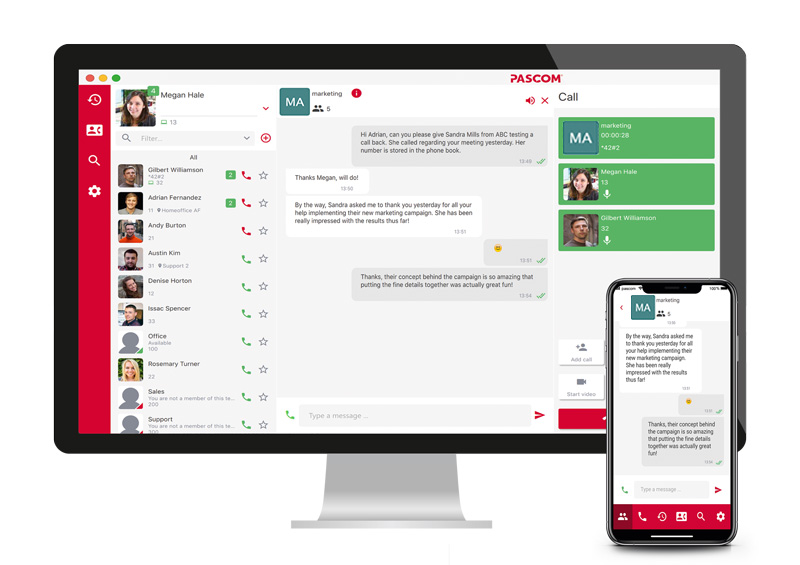
The new PASCOM Team Messaging tools form the foundation for further innovative Team Collaboration features starting with Team Audio Conference Rooms. By using the new audio conferencing tools, it is possible to turn the group chat into an audio conference as needed. Therefore, should a pressing issue come up that needs to be discussed, the group can be notified via team chat and the conference can be started immediately without any scheduling or virtual conference room sign in or setup issues. Furthermore, as soon as an audio conference has started, it will become visible to both desktop and mobile group members enabling them to simply join the conference from wherever they are on the device they happen to be using.
Video Conferencing
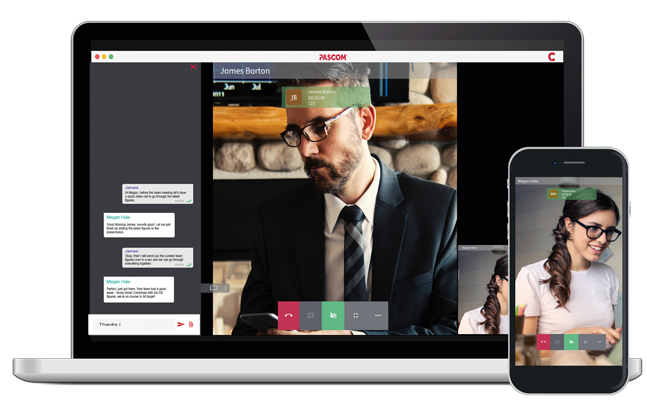
55% of communication is visual and that means sometimes audio conferencing is simply not enough to convey meaning effectively. In such a scenario, video conferencing is the ideal collaboration tool to improve meeting effectiveness and with pascom’s native video conferencing tools, starting a video conference from your desktop, mobile device or conference / huddle room is as simple as clicking a button. There’s no need for any additional software, browsers or plugins ensuring that pascom's video conferencing tools are available to all users and any compatibility issues are avoided - all you need is the PASCOM UC app and a webcam.
Screen Sharing
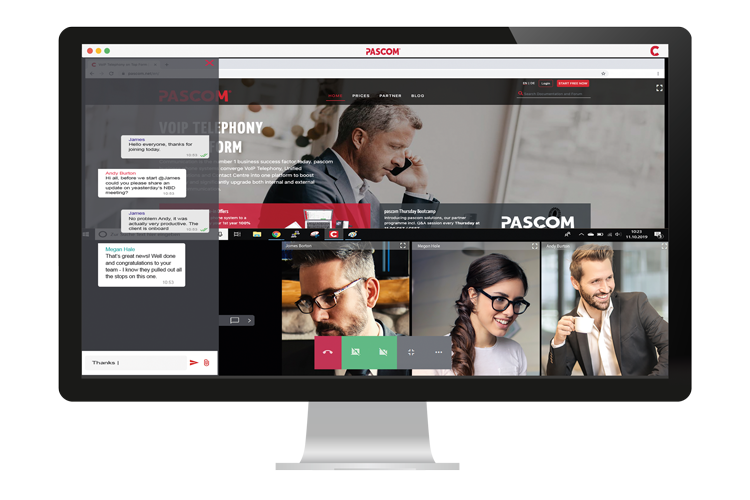
With PASCOM 19 adding yet more visual aids to your team conferences is just as simple as starting a video conference. During a call, audio or video conference, simply turn on the screen sharing tool in order to deliver amazing presentations, provide detailed demos, training or explanations. Regardless of whether your users are in the office, in HomeOffice or on the go, they will be able to view screen sharing presentations no matter which device they are using[*]. Screen sharing is such an effective collaboration tool that while there's no argument that video conferencing is an essential Team Collaboration tool, screen sharing is arguably just as important if not more so - I guess it depends on the use case of which there are many.
[*] The PASCOM 19 BETA does not currently support sharing mobile screens
Enhanced User Experience
Alongside the host of new collaboration tools, the PASCOM 19 BETA also includes a range of User Experience (UX) enhancements, particularly for mobile users. The Instant Messaging chat UI has been revamped to include a more user-friendly and more intuitive workflow.
The inclusion of a new lightweight client protocol ensures that client responsiveness is significantly faster across all platforms (notably on mobile) and that the search and filter tools are not only more intuitive to use, but also more mobile user-friendly. This is particularly notable with the mobile app’s reworked in-call experience and options. A further enhancement with PASCOM 19 includes the integration of the Android Connection Service to ensure more reliable and consistent call management as well as enabling notifications on Smart Wearables plus improved connectivity with car handsfree systems.
Upgrading to PASCOM 19 BETA
The PASCOM 19 BETA is now available and all new pascom.cloud free instances are automatically deployed using the PASCOM 19 BETA phone system, making this the perfect option for testing the BETA before upgrading.
During the PASCOM 19 BETA phase, existing pascom.cloud PASCOM 18 customers will not be automatically updated to PASCOM 19. Once PASCOM 19 is no longer in BETA, it will be automatically deployed to all cloud customers. However, should a cloud customer wish to be upgraded to PASCOM 19, they should contact either the PASCOM sales team or their PASCOM reseller partner.
As is usual for on-premise customers, they have the option of choosing when to upgrade and can do so using the BETA ISO download file.
Snom Exchange: New For Old
Upgrade Business Telephony with PASCOM and the Snom Exchange
Within the IT world, it is common knowledge that the older the infrastructure, the higher the potential risk whether it be hardware failure, lack of support or worse still, potential security issues. Plus there are other benefits to upgrading your infrastructure and when it comes to business VoIP phones, we are talking about enhanced audio quality, new functions, simpler management and cutting edge design. So if you are an existing PASCOM / Snom customer or even a Snom customer interested in upgrading your business communications withPASCOM, read on as we’ve got a great upgrade offer for you.
We think it is fair to say that you probably have a number of Snom 320’s or 760’s scattered around your office. As Snom are the pioneering Desktop VoIP phone vendor, it shouldn't really come as a surprise. The problem is that these devices are now end of life, meaning less or no support, lower functionality, out of date design and most importantly inherently less secure. Moreover, as a PASCOM customer, it is also important to know that from PASCOM 19 onwards, the Snom 3xx and Snom 7xx series of VoIP devices will no longer be supported.
The good news is here’s your chance to swap out all those telephones and benefit from an exceptional trade-in bonus to sweeten the deal – which will make winning over the finance controller that much easier as well.
Which Telephones Are Included?
If you are the proud owner of any of the below Snom VoIP phones, then you are eligible to benefit from the Snom Exchange programme:
| Models | |
|---|---|
| Snom 300 | Snom 320 |
| Snom 360 | Snom 370 |
| Snom 710 | Snom 720 |
| Snom 760 | Snom 820 |
| Snom 821 | Snom 870 |
By trading in your old Snom phones from the above list for any of the below brand new, ultra modern Snom VoIP phones:
| Snom Models | ||
|---|---|---|

|

|


|

|

|
How Does Snom Exchange Work?
The Snom Exchange programme is actually pretty straightforward. All you need to do is follow these simple steps:
- Select and purchase your new Snom phones from the list above directly from pascom
- Send us the MAC addresses of the devices to be traded in
- The ordered phones will be sent to you and you will benefit from the Snom Exchange bonus discount.
What’s On Offer?
To celebrate the launch of the Snom Exchange programme, together with our partners at Snom, we are offering a limited time double trade-in bonus. Meaning that, depending on the new device(s) you choose to upgrade to, a tiered exchange bonus as follows is on offer:
| Device | Exchange Bonus |
|---|---|
| Snom D315 / D717 | € 14 |
| Snom D335 / D735 | € 18 |
| Snom D385 / D785 | € 24 |
In addition to the Snom Exchange programme, an Exchange Plus programme is also available which includes any audio conferencing or headset devices that may also need to be upgraded as a result:
| Device | Exchange Plus Bonus |
|---|---|
| A150 | € 14 |
| A170 | € 18 |
| C52 (incl. DECT Dongle) | € 24 |
PASCOM Snom Exchange: Who Can Benefit?
The PASCOM Snom Exchange programme is available in conjunction with a PASCOM phone system subscription. Meaning the programme is open to all existing PASCOM / Snom customers as well as new customers looking to upgrade their business communications with pascom.
Existing PASCOM Customers
Existing PASCOM customers can benefit from either of two options. Firstly, they can simply upgrade the Snom endpoints they already have deployed without requiring any changes to their PASCOM subscription. Alternatively, existing PASCOM customers can enjoy yet more value for money with 1 Year Free by either changing their onsite installation to the new subscription model or migrating their business communications platform to the pascom.cloud including PASCOM hosting.
New to pascom?
Are you new toPASCOM, interested in upgrading your business communications AND have a number of Snom phones that could be upgraded? If the answer is yes, then you too can benefit. When choosing your PASCOM subscription, let us know how many Snoms desktop VoIP phones you want to trade up and we will gladly pass on the price saving benefits of the Snom Exchange programme.
Furthermore, if you are upgrading from PASCOM from either 3cx or Nfon, then our 1 Year Free trade-in offer also applies, saving you your first year subscription and permanently free hosting if you choose the pascom.cloud.
Final Word
For more information aboutPASCOM, our PASCOM phone systems and the Snom Exchange trade in offer, give our team a call on +49 991 29691 0 and get started within minutes using our free hosted business VoIP phone system edition.
PASCOM Partner Summit 2019 Review
PASCOM Resellers Kick Off 2019 at Annual Partner Summit
Let me start by saying a massive thank you to all our PASCOM phone system resellers and partner summit sponsors who joined us in Regensburg last week. Despite the wintery conditions that have held a vice like grip over parts of Bavaria, Austria and Switzerland during the previous weeks, we enjoyed a 95% attendance – which I have to say is top draw stuff!
News from the Summit
First and foremost, the PASCOM partner summit continues to grow which is obviously exciting in of itself. In 2019, the audience grew by a significant 118%, which just goes to show that we love engaging with our partners and we will strive to continue in this fashion in everything we do.
Furthermore, the stats and the feedback paint a colourful picture. As reported by Mathias Pasquay during his review and roadmap segment, compared to the same period in 2017, the statistics confirm that since the release of PASCOM 18 and the restructuring of our business model, we have enjoyed positive growth in all aspects of our business. Beyond this, the partner feedback sessions reaffirmed that the changes to our licensing, partner programme and telephony platform, which we introduced with PASCOM 18, have all combined to bolster partner sales successes, which is obviously fantastic to hear!

Coinciding with the summit, we also release PASCOM phone system version 18.04, which incidentally also includes the option of automatically setting up a free peoplefone SIP trunk account including 10 € of Airtime. Coupled with the ease and speed with which it is now possible to setup up a new free instance, this new functionality and collaboration with peoplefone serves to provide all new potential customers with an out of the box telephony solution that can be put into operation almost immediately.
Cloud is Now Mainstream
A notable growth area that we have witnessed since the release of PASCOM 18 is in the adoption of cloud telephony solutions which has grown a whopping 1000 + percent! Okay, this figure is somewhat exaggerated by the fact that previous cloud sales were not monumental, but it just goes to show that customer acceptance of cloud telephony across the D-A-CH region is on the rise and is now well and truly mainstream. Therefore, it goes without saying that the response to pascom.cloud hosting being included in the licence fee and not as an additional add-on for customers was also overwhelmingly positive.
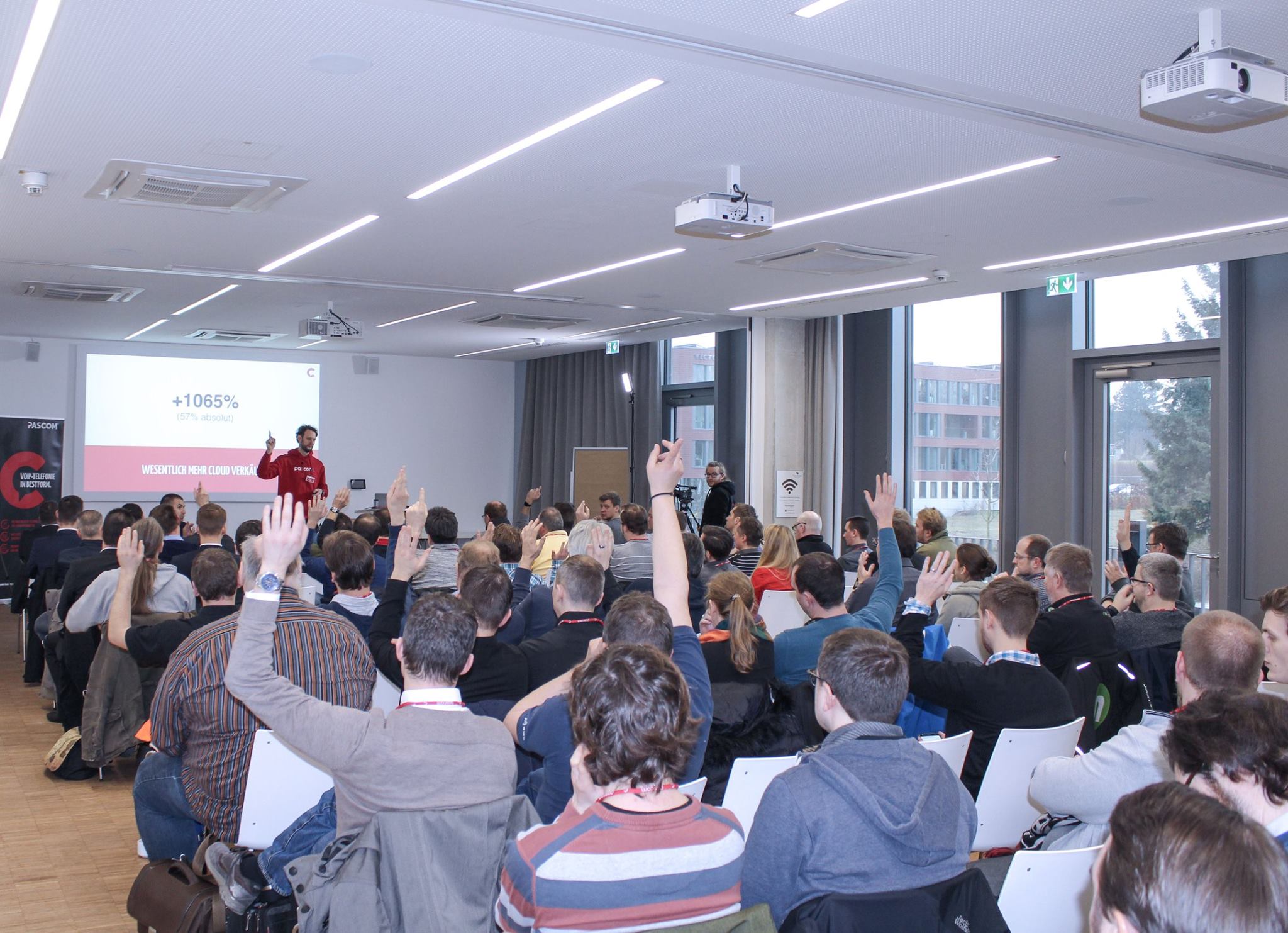
Workshops and Networking
PASCOM 18 is still relatively new, meaning that existing partners likely have a number of customers still on the older PASCOM 17 platform. So it is just as well then that the team where on hand to deliver a PASCOM 18 migration workshop, performing a step by step migration to clearly demonstrate how existing customers can switch to the new platform and therefore enjoy even greater added value from their communications solution.
Throughout the event, we also played host to leading telecommunication industry names including VoIP phone and DECT solution specialists Snom, Mitel, Grandstream and Yealink as well as SIP carrier partners Easybell, peoplefone and HFO Telecom. As usual, the Sponsor Podium was well used by our audience, who benefited from the insider insight of our technology partners as well as grasped the opportunity to inform themselves on the latest goings on and trends within the industry.
In addition, ample time was planned into the agenda to allow our resellers and technology partners to get in some networking and delve into one to one discussions concerning particular products or projects. In the exhibition area, Snom was a particularly well-visited sponsor stand this year. Perhaps unsurprisingly so, as not only do the new Snom devices have plenty to shout about, but the team in Berlin also graciously offered to give away a top of the range Snom D385 VoIP phone to each and every attendee – an action that was particularly well received as you can imagine.
The Future of Business Communications
A hot topic throughout the show was of course the future of business communications and the PASCOM product development roadmap. With the ISDN shutdown and the transition to All IP and Cloud platforms still impacting todays’ market, the obvious question on everyone’s mind was “what’s next”? Well for the time being it seems that our resellers and technology partners agree, it doesn't appear that the way we communicate will undergo any radical transformation in the very near future. The desktop phone is not going to die overnight, SIP trunking adoption will continue and the trend towards a more mobile, more collaboration, more service orientated infrastructure will continue gaining momentum.
For full details of the PASCOM roadmap, well they are classified and don’t belong in the public domain, so you will just have to gain clearance and attend one of our partner events to find out more.
10 Benefits of Voice over IP vs the ISDN
10 Benefits of Voice over IP
With the ISDN switch off already underway, it is inevitable that at some point in the short to mid term future; every business will have to address the topic of Voice over IP. Many have already made the leap to VoIP and are reaping the rewards of being at the forefront of business communications. Others are just now making the switch, some being forced by their provider – Deutsch Telekom are pushing the switch to All-IP by the end of 2018, as are Swisscom and BT in the U.K. are planning the ISDN switch off for 2025.
Either way, switching to a VoIP phone system and All IP technologies provides business with a number of advantages compared to legacy ISDN / analog connections and in the following article we have outlined just 10 of them:
1. Worldwide Availability with Voice over IP
Download and install the VoIP application on your laptop and / or smartphone and log in using your personal user account or in the case of smartphones pair your mobile VoIP app and that’s it, you are not reachable from anywhere via your VoIP phone system. The objective is to make telephone communication as location independent and convenient as checking your e-mails. This has obvious benefits for team members who often work from HomeOffice or from multiple offices.
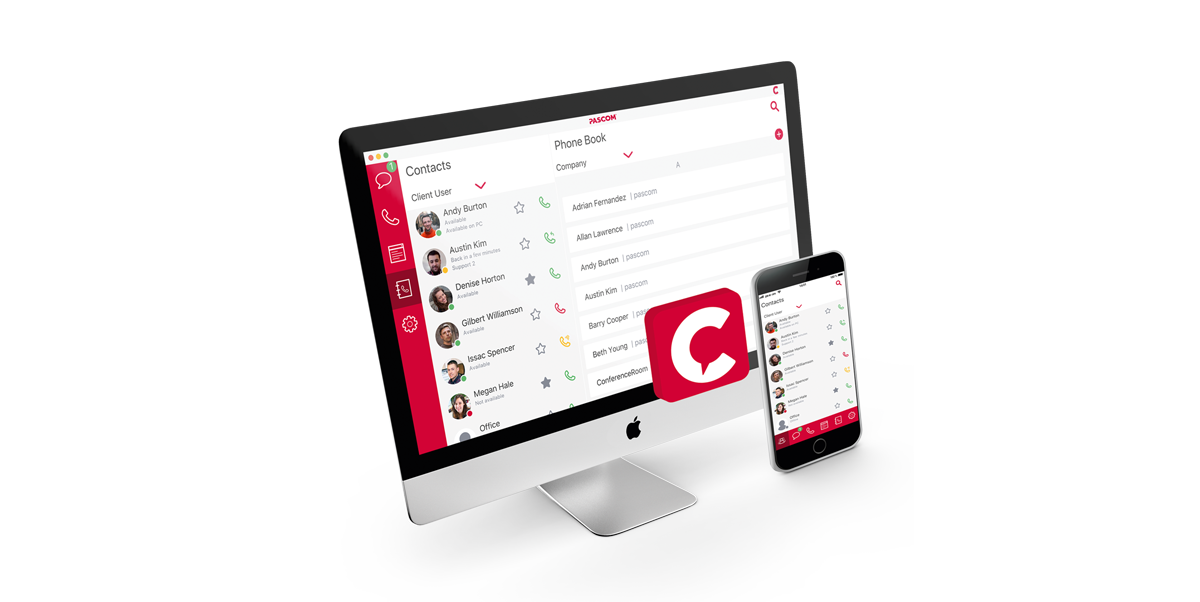
Thanks to Voice over IP solutions, it is possible to take your individual office number with you without needing to configure a new phone everytime. Simply use the“Hotdesking” feature and log on to an available desktop IP phone using your personal details or into your desktop application and either select the appropriate “desk” from a list of available work locations or use the in-built softphone.
2. Improved Audio Quality
Advancements in audio codecs such as High Definition (HD) audio and the OPUS codec ensure that not only do VoIP phone systems deliver a consistently higher standard of in-call audio quality but also throughout the complete call from beginning to end. As such, callers will benefit from a considerably more enjoyable in-call experience, particularly when the audio enhancements are supported by intelligent call flow management tools such as customized prompts, music on hold, flexible teams and intuitive call distribution.
3. Scalable to Any Business Size
Voice over IP solutions (VoIP for short) routes calls over an IP network such as the Internet as opposed to over traditional fixed landlines. In doing so the, the call is sent over the Internet in the form of encrypted packets. Business VoIP solutions can be based on a number of different frameworks. PASCOM business phone systems, for example, are based on Asterisk, the world’s leading OpenSource VoIP software. Using Asterisk as the core of our software-based phone systems enables us to offer highly scalable and customizable business communications solutions built on OpenStandards and therefore deployable in most common IT Landscapes.
Phone system hardware server: our PASCOM phone systems are available as a server hardware solution, i.e. a hardware appliance which is delivered pre-installed and pre-configured to your business needs. As such, you need only to unpack and connect your new phone system server and you’re ready to go.

Virtual phone systems: should you have a virtual infrastructure available to you, a virtualized phone system could be the ideal PBX deployment option for your business. With a PASCOM virtual IP PBX, you can be up and running in a matter of minutes. Simply download the ISO file, install within your existing infrastructure and setup up your system and that’s it, your basic telephony needs will be covered.
Cloud phone systems: an excellent choice for startups, SMBs as well as any company looking to centralized their business communications, pascom’s cloud phone system offers the ultimate in scalability, flexibility and ease of setup. Additional significant benefits also include pascom’s free of charge hosting and the option of managed services, meaning that after setting up your login credentials, you can immediately get started and should you require support, the PASCOM team are always on call to lend a hand.
4. Productivity Increases
Voice over IP business phone systems don’t just offer superior, yet cheaper calls and call management, but also enable IP based data transmissions. As a result, modern business phone systems include a range of productivity enhancing collaboration tools such as softphones, instant messaging, file sharing, presence management, audio conferencing, contact and call center functions and much more.
In the case of instant messaging, automated delivered and read “reports” provide users with real-time feedback as to whether the recipient has read the message or not. Location tags and presence management supports users in making contact decisions quicker and more intelligently. In essence, thanks to Unified Communications and Collaboration, virtual collaboration now knows no boundaries no matter the geographical separation between an employee and their colleagues, customers and business partners.
5. Centralised, Streamlined Solution Management with VoIP
Regardless of which Voice over IP business phone system deployment option you choose, software based VoIP systems support businesses simplify solution management. For example, hardware deployments, adding users and importing contact information can all be managed centrally and often automatically, greatly reducing IT administrative hassle and resource utilisation.
In the case of hardware phones, they are no longer must haves thanks to the advent of softphones and mobile VoIP. Should you choose to deploy hardware IP phones, most modern devices support PoE (Power over Ethernet), meaning no additional power cabling is required and whilst also reducing energy consumption. Furthermore, top of the range solutions will also include a virtual faxing solution, enabling businesses to optimize and reduce the number of analog deployed fax devices.
6. Cost Savings with PASCOM VoIP Solutions
First up, with VoIP solutions, you can generally eliminate all internal telecom costs as all internal calls are routed internally and are therefore not billed by your provider. Moreover, mobile softphones and UC apps ensure that even mobile communication costs are significantly reduced, even when calling from abroad as mobile data or wireless networks are used, thus greatly reducing international call costs.
OpenStandards phone system solutions such as pascom’s also offer customers more freedom when it comes to selecting the voice carrier (or carriers) that best suit your business requirements. A great example of this could be by integrating international carriers to one; provide your customers with a local number to call and two, reduce your international calling costs. Compared to ISDN connections, it is possible for internationally active companies to realize over 50% cost savings for international calls.
7. Maintenance and Security
While it is true that the security of VoIP telephony solutions is often called into question, correctly implemented modern solutions are in fact often more secure. Leading vendors such asPASCOM, recognize the importance of VoIP software security and this is therefore reflected in the fact that security is a core element of their solution. As a result, when using a PASCOM solution, you can rest assured that not only are your calls encrypted and secure, so are your PASCOM UC client instant messages and file transfers.
A further benefit of VoIP software solutions over legacy ISDN solutions is the regularity and availability of updates. Not only are updates more regular, they are normally included at little or no extra cost. What’s more, as we are talking about a software update, updates are more often than not quickly, simply and easily implemented without requiring additional hardware components or modules or much administrative hassle.
Quick and uncomplicated remote maintenance via the Internet is not only secure, thanks to pascom’s incorporated Session Border Controller, but also ensures that companies are more mobile and flexible in terms of Business Continuity. If necessary, phone system admins can access the solution from anywhere and at anytime for maintenance and service issues. Through using the phone system’s in built system health check notifications, admins are able to proactively react to issues as they arise, meaning lower downtime and more continuous service. Of course, it you wish to add additional security, access can also be restricted to the company network via VPN.
8. One Number Concept
A further benefit of VoIP solutions is the One Number Concept, the benefits of which can be applied to users as well as the company as a whole. National companies, for example, now only need one number and calls can be routed across all company locations nationwide, no matter where the solution is hosted. Obviously, this is option is more suited to the smaller startup or SOHO organisation. However, the concept itsef delivers benefits for all business sizes. For example, should you have a number of Direct Inward Dials (DIDs) mapped to internal employee and team extensions, the one number concept and Find Me Follow Me tools ensure that no matter where you and your team work from, they will be directly reachable on their specific office number.
In terms of international business relationships, the one number concept also delivers significant advantages as your team will enjoy worldwide availability on their office number, no matter where their location. Therefore, even if your business employs a number of carriers to deliver local numbers, customers, business partners and employees will need only one local number on which to contact any member of your team globally.
9. More Efficient Customer Service with VoIP Call and Contact Centres
Compared to legacy ISDN phone systems (and even a number of IP phone system vendors), pascom’s business phone system includes a range of call and contact centre functionality as standard with which businesses are able to realize significant customer service efficiency and satisfaction gains. With AutoAttendants, Interactive Voice Response (IVR) option menus, Music on Hold and Prompts, Automatic Call Distribution (ACD) and even Skills based routing included as standard, your business will have all the contact centre tools needed to professionally and efficiently manage all your calls.
For example, with our VoIP solution, team management has never been simpler. Even extension management is greatly simplified, e.g. when adding a new Team (a.k.a Queue), the phone system will automatically suggest the next available extension or alternatively, you can manually assign an extension to the team and be assured that you will not suffer any call flow loops thanks to the solutions automatic extension assignment checking tool.
Assign teams according to roles, i.e. sales, and the once setup, calls to the team will then be routed to all assigned team members according to your preferred call routing strategy. Alternatively, thanks to skills based routing it is possible to assign individual members with specific skills such as product knowledge or languages and ensure your calls are answered not only quicker, but also by the most appropriately skilled employee at the first time of asking.
Further boost customer service with Contact Centre tools such as call recording, call analytics and 3rd party application integration. Call recording can be used for quality assurance and training purposes while call analytics can be used to graphically display live call volumes. Historical call analytics can be used to identify trends in call volumes even down to the level of specific skills, which can then be applied to ensure appropriate staffing levels. Finally, integrating 3rd party applications such as CRM and ERP systems can be used to provide team members with access to other sources of business intelligence if the form of call labels displayed within the PASCOM UC client before answering, during and after calls.
In essence, the combination of easy to manage call routing and management tools will support you in ensuring your callers benefit from not only shorter wait times, but also more enjoyable in call experiences.
10. VoIP Solution Setup
Follow these 7 steps in order to switch to and setup your business VoIP phone:
Choose from either a PASCOM Cloud or On-premise solution.
Import your users from your Active Directory / LDAP. Alternatively, download, complete and upload our Advanced User Excel Import file. You can also add phone assignments at this stage to automate elements of step 3.
In the case of on-premise solutions, your PASCOM phone system can automatically detect, add and configure supported IP endpoints and can now be assigned to individual users. For cloud solutions, end points will either be delivered pre-configured or will be on-boarded during the initial system setup support session.
Download and install the appropriate PASCOM desktop UC clients (Windows, Mac and Linux) and the PASCOM mobile apps for Android and iOS.
Plan and map your extensions / call flow concept. For testing purposes, add a switchboard extension, which can be setup to play a prompt or forward the call to a voicemail box. To test external calls you will need to add a SIP provider account.
Test the solution all functions such as softphones, instant messaging, ACD and so on.
- Once satisfied, you can now register the solution with your VoIP carrier of choice and / or port old phone numbers to your new provider. In this step, you can also implement your call flow concept to correctly route calls to teams and users according to your plan from step 5.
Final Word
A well-configured business phone system that oozes useful tools, delivers excellent audio quality and intuitive call flows will leave callers with a highly professional impression. The configuration options and application availability and how well they are utilized will have a decisive impact on how professionally you manage your calls and therefore how your customers view your company. The switch to a PASCOM VoIP solution provides the opportunity to not only upgrade your internal collaboration but also to redefine telephony in your company.
Give the PASCOM team a call on +49 991 29691 0 to discuss your requirements and get started within minutes using our free hosted business VoIP phone system edition.